
Patient Portal Help
To help you and your family navigate the patient portal, we have prepared this page to help you with any difficulties you may experience.
To help you and your family navigate the patient portal, we have prepared this page to help you with any difficulties you may experience.
In order to authenticate each parent/guardian with each child in a safe and secure way, you will be provided a secure PIN for each individual child, which will come in separate emails.
If your child is over 18, your child will need to set up their own portal account. If they wish for a parent to have access to this account, they will need to request to add a parent as a proxy account.
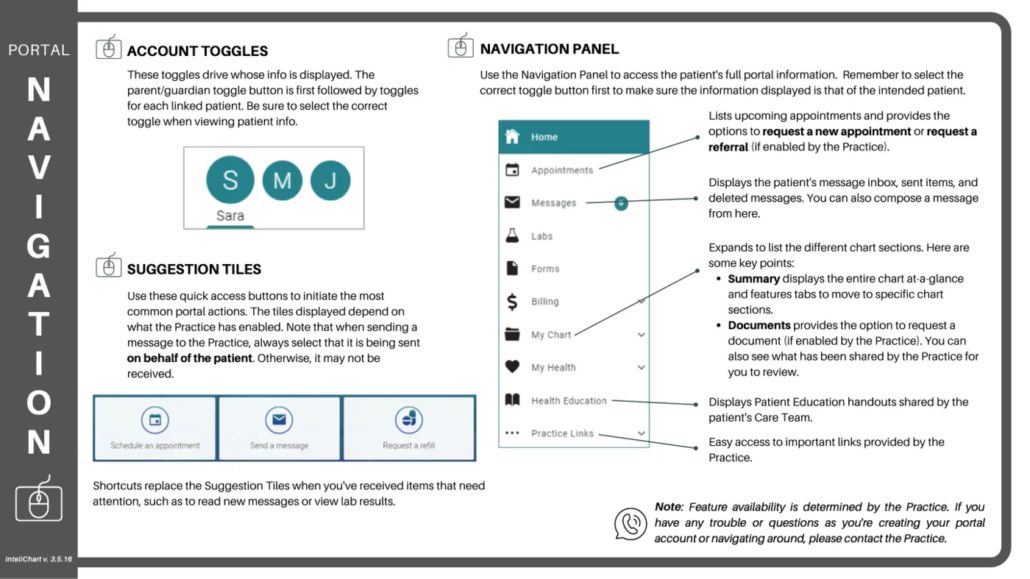
Once your portal account is activated, here is a good reference on finding your way around.

30400 Telegraph Rd, Suite 101
Bingham Farms, MI 48025-4371
Phone
248-642-5437
Fax
248-642-5456
Monday - Thursday
8:00 am - 6:00 pm
Friday
8:00 am - 5:00 pm
Saturday - Sunday
Closed
Monday - Friday
8:00 am - 8:45 am
5793 West Maple Road, Suite 153
West Bloomfield, MI 48322-4478
Phone
248-539-7726
Fax
248-539-7823
Monday - Friday
8:00 am - 5:00 pm
Saturday - Sunday
8:30 am - 12:00 pm
Only sick visits by appointment, no walk-ins. Hours may vary by demand.
Our doctors are on staff at Corewell Health William Beaumont University Hospital, Children’s Hospital of Michigan, and Henry Ford West Bloomfield Hospital.
If your child’s illness or injury is life threatening, dial 911.
Otherwise, for urgent matters that cannot wait until business hours, please call our answering service at 248-691-8614, and the doctor on call will contact you as soon as possible. While you are waiting for the doctor to return your call, please deactivate any call-blocking features on your phone. For privacy purposes, our doctors block their numbers.
Poison Control Hotline
(800) 222-1222
Suicide & Crisis Lifeline
Dial/Text/Chat 988
www.988lifeline.org